Category: Website Performance
Reading time: approximately 8 minutes
A slow website is one of those problems that is easy to overlook because it does not announce itself. There is no error message, no warning sign. Visitors just leave quietly, and you never know they were there. This guide explains why websites slow down, what that actually costs a business in real terms, and what a good performance score looks like.
Why is my website slow?
There are several common reasons, and most sites have more than one of them working against them at once.
Heavy images. The most common cause by far. A photograph taken on a modern phone can be several megabytes in size. Multiply that by six or eight images on a page and the site has to download a significant amount of data before anything appears on screen. Images need to be compressed and served in modern formats to load quickly, and most sites skip this step entirely.

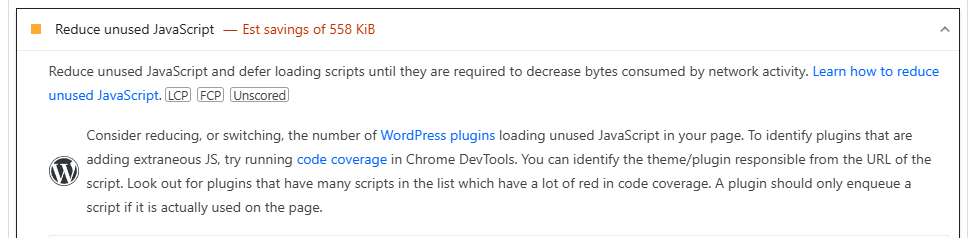
Too many plugins. WordPress sites in particular accumulate plugins over time. Each one adds weight to the page, often loading scripts and stylesheets that run whether they are needed or not. A site with twenty active plugins is almost always slower than one with five, even if the extra fifteen seem harmless.
Cheap or shared hosting. The server your site lives on matters. A slow server adds load time before a single file has been transferred. Shared hosting, where your site sits alongside hundreds of others on the same machine, can mean your performance suffers when other sites on the server are busy.
No caching. Caching stores a ready-made version of your pages so they do not have to be rebuilt from scratch every time someone visits. Without it, every page load triggers a fresh process on the server, which adds time.

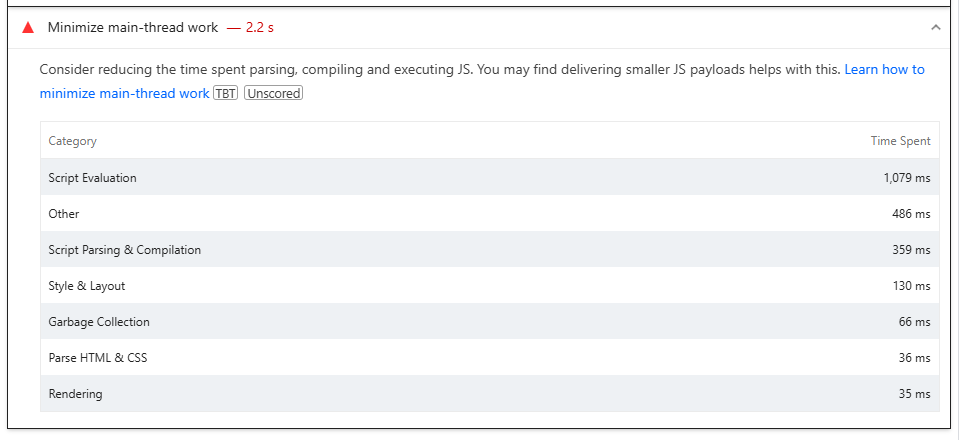
Unoptimised code. Bloated or poorly written code forces the browser to do more work than necessary. This is particularly common on template-based sites where the underlying code was built to handle every possible use case, not just yours.
Does site speed affect Google ranking?
Yes — though it is worth being precise about how, because this gets overstated by people selling speed work.
Page experience is a genuine Google signal and has been since 2010 for desktop and 2018 for mobile. But it is not a trump card. Google’s own line is that it will not outrank genuinely more relevant content: given two pages of similar quality and relevance, the faster one has the advantage. Speed is a tiebreaker, not a substitute for being the better answer.
Where speed is closer to non-negotiable is the AI layer. Google lists solid page experience among the prerequisites for a page being usable in its generative AI features, alongside being indexed and snippet-eligible. So the sharper framing is not “slow sites get penalised” — it is that slow sites are working against a baseline everyone else clears.
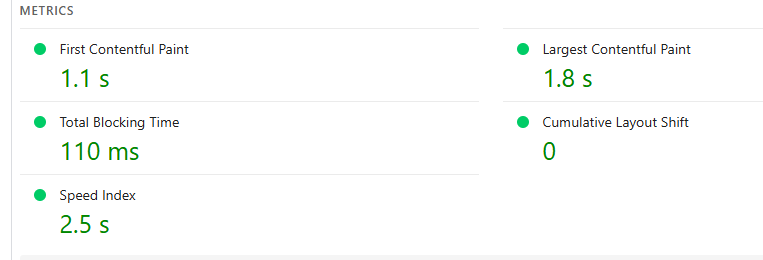
The specific signals Google measures are grouped under Core Web Vitals: how quickly the main content of a page loads, how responsive the page is to interaction, and how stable the layout is while it loads. Pages that fail these consistently are competing with a handicap — and on a results page where several businesses answer the question about equally well, that handicap decides it.
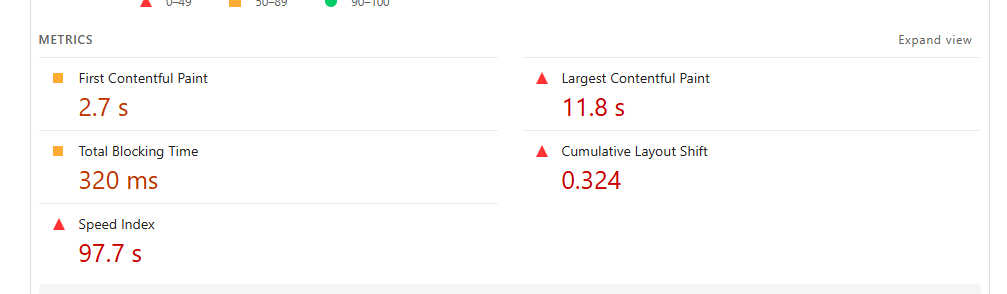
There is a second-order effect too, and it is arguably the bigger one. A fast page keeps people on it. A slow page sends them back to the results to try someone else — and that behaviour is visible. The speed is what you fix; the engagement is what actually moves.
What is the 3 second rule in website design?
“Three seconds” is the figure that gets quoted most often, and it comes from industry research rather than from Google. Treat the exact number as a rule of thumb rather than a hard line — different studies, devices, and connection speeds move it around, and mobile thresholds tend to be tighter. The direction, though, is not in dispute across any of them.
After three seconds, bounce rates climb sharply. After five seconds, a significant portion of visitors have already gone elsewhere, often to a competitor whose site loaded faster.
But the time pressure starts even before the page has fully loaded. Research from Carleton University found that users form an opinion about a website’s visual appeal in as little as 50 milliseconds — that is 0.05 seconds, faster than a blink. Google’s own research found some opinions form in as little as 17 milliseconds. By the time your page has finished loading, the visitor has already decided how they feel about it.
For a service business, this means a slow site is not just a technical inconvenience. It is a direct loss of enquiries. Someone who searched for exactly what you offer, clicked your link, and left in frustration because the page was still loading is a customer you will never know you lost.
How do I test my website speed?
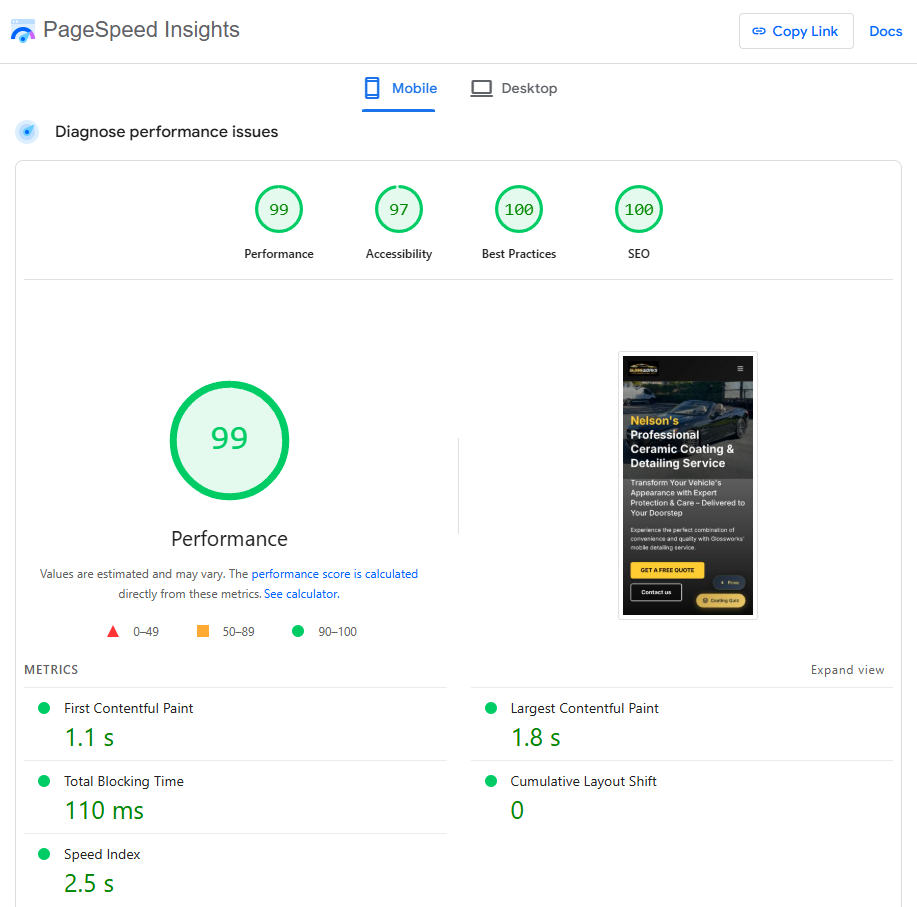
The most reliable free tool is Google PageSpeed Insights, available at pagespeed.web.dev. Enter your URL and it will analyse your site across four categories and give you a score out of 100 for each, along with specific recommendations for improvement.
The four categories it measures are:
Performance — how quickly the page loads and becomes usable.
Accessibility — how well the site works for people using assistive technology.
Best Practices — whether the site follows modern technical and security standards.
SEO — whether the site is correctly structured for search engines to read and rank it.
It tests both desktop and mobile separately, which matters because mobile performance is often significantly worse than desktop on the same site.
What is a good PageSpeed score?
Scores fall into three bands:
- 90 to 100 is considered good
- 50 to 89 needs improvement
- Below 50 is considered poor
A score of 90 or above across all four categories, on both desktop and mobile, is what a well-built site should achieve.
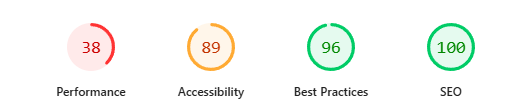

To give you a real-world reference point: every site Pounamu Creative has built has come back A or A+ on independent testing across all four categories, on both desktop and mobile, with a combined average of 97.7 out of 100. That is what is possible when performance is built in from day one rather than addressed after the fact.
Is 75 a good SEO score?
Not really. Using the same letter grade scale that applies to all PageSpeed scores, a 75 falls squarely in the C range — a pass, but not a good one. Search engines are finding something on your site that is making it harder to read, index, or rank properly.
To put that in context: the sites Pounamu Creative has built score an average of 97.7 out of 100 across all four categories, which puts them solidly in the A+ range. A score of 75 is more than 20 points behind that, which in real-world terms means slower load times, more technical issues, and lower visibility in search results.
Common reasons for a lower SEO score include missing or duplicate page titles and descriptions, images without descriptive alt text, links without clear labels, and pages that are not being indexed correctly.
A score of 90 or above is the target. Getting there is usually a combination of technical fixes and making sure your content is structured clearly for search engines, not just for human readers.
Does website traffic increase Google ranking?
Traffic itself is not a direct ranking factor, but user behaviour is.
If people visit your site and leave immediately without clicking anything, that signals to Google that the page did not give them what they were looking for. If they stay, scroll, and interact, that signals the opposite.
A fast, well-structured site that loads quickly and clearly communicates what it offers tends to keep visitors engaged longer. That behaviour feeds back into how Google evaluates the page over time. So while traffic does not directly move your ranking, the quality of what visitors do when they arrive does.

Why does 96.55% of content get no traffic from Google?
This figure, which comes from Ahrefs research, refers to the fact that the vast majority of pages on the internet receive no organic traffic at all. Not one click per month from search.
The reasons vary. Some pages have never been indexed. Some are on sites with such low authority that Google does not surface them for competitive searches. Some cover topics with no search demand. And many are on slow, poorly structured sites that Google has simply ranked too low for anyone to find them.
The practical implication is that having a website is not the same as having a website that brings in customers. The two are very different things, and the gap between them is where most of the work lies.
How do I speed up my website?
The most effective improvements, in rough order of impact:
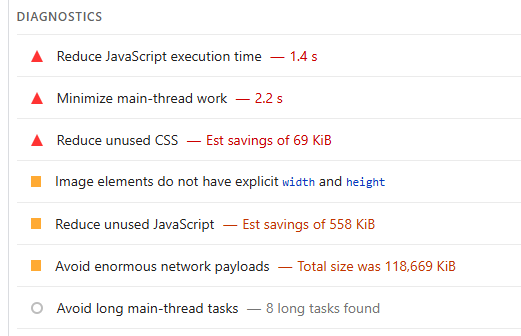
Compress and properly format your images before uploading them. Use modern formats where possible, and make sure large images are not being loaded at full resolution on small screens.
Review your plugins if you are on WordPress. Deactivate and delete anything that is not actively contributing something useful. This is one of the core reasons template and WordPress sites often underperform custom-built ones — the plugin overhead is built into the platform from day one.
Use a caching solution so the server is not rebuilding pages from scratch on every visit.
Consider your hosting. If your site is on a very cheap shared plan and performance is suffering, better hosting is often the simplest fix.
For more significant performance improvements, particularly on sites with structural issues in the underlying code, the most reliable path is a rebuild by someone who builds for performance from the ground up rather than retrofitting it later.
Want to understand how site speed connects to your search rankings and AI visibility? Read our guide: Is SEO dead in 2026? Not quite — here’s what’s really happening.
A slow site is often a symptom of a deeper platform problem. Read our guide: What is the difference between a template website and a custom-built one?
Or if you want to know how your site is actually performing:
Published by Pounamu Creative, Nelson NZ
Built to be found
Frequently asked questions
- What is the most common reason websites feel slow?
- Heavy images, too much JavaScript, and bloated themes are the usual suspects. Each adds seconds before content is usable.
- Does site speed affect Google rankings?
- Yes, indirectly. Google uses experience signals; slow sites often get higher bounce rates and less engagement, which hurts visibility over time.
- What is a good PageSpeed score to aim for?
- Aim for solid green on Core Web Vitals for real users on mobile, not just a lab number. The exact score matters less than consistent fast loads on 3G and 4G.