Category: Search and Visibility
Reading time: approximately 7 minutes
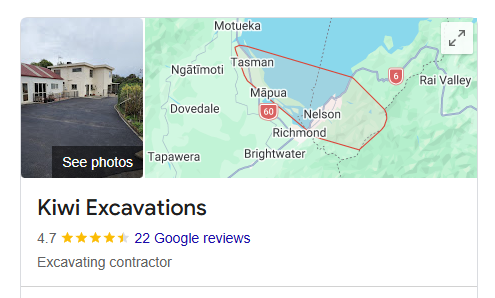
If you have ever searched for a local business on Google and seen a panel on the right-hand side of the screen showing the business’s address, phone number, hours, photos, and reviews, that is a Google Business Profile at work. It is one of the most useful free tools available to small businesses in New Zealand, and one of the most commonly underused.
This guide explains what it is, what it does, and what happens if you do not have one.
What is a Google Business Profile?
A Google Business Profile (previously called Google My Business, which you may still see referenced) is a free listing that lets you control how your business appears across Google Search and Google Maps.
When someone searches for your business name, or for a type of business in your area, Google draws on your Business Profile to show relevant details directly in the search results. That means your address, phone number, hours, website link, and customer reviews can all appear before anyone has clicked through to your site.
It is also the primary source Google and many AI tools use when making local business recommendations. A complete, well-managed profile signals to Google that your business is active, legitimate, and worth surfacing.
Is Google Business Profile free?
Yes, entirely. Google does not charge to create or maintain a Business Profile. You can set one up, add photos, post updates, respond to reviews, and manage your information at no cost.
The investment is time rather than money. A profile that is set up and never touched again will perform less well than one that is actively maintained. But the barrier to entry is zero, which means there is no good reason for any NZ business that serves local customers to not have one.
What is the difference between Google Business Profile and Google My Business?
They are the same thing. Google rebranded the product from Google My Business to Google Business Profile in 2022. If you see the old name referenced somewhere, it is simply referring to the same tool under its previous name. The functionality is largely the same, and if you already had a Google My Business listing, it carried over automatically.
Does a Google Business Profile help with search rankings?
Yes, directly and significantly for local search.
When someone searches for a service near them — “plumber in Nelson” or “bookkeeper near me” — Google uses a combination of relevance, distance, and prominence to decide which businesses to show. Your Business Profile feeds into all three of those factors.
A complete profile with accurate categories, a clear description, regular photos, and an active review history performs considerably better in local search than a bare-bones or incomplete one. Google treats profile completeness as a signal of a legitimate, active business.
For Google Maps specifically, your Business Profile is your entire presence. There is no website, no custom design — just your profile and what you have put into it. A business without a profile does not appear on Maps at all.
What happens if I do not have a Google Business Profile?
Several things, none of them good.
You are invisible on Google Maps. Anyone searching for your type of business on Maps will not find you, regardless of how long you have been operating or how good your reputation is.
You lose control of your information. Google sometimes creates automatic listings for businesses based on data it finds online. If you have not claimed your profile, that listing may contain incorrect information, old addresses, or hours that have not been updated. You cannot correct it without claiming the profile.
Competitors with active profiles appear in searches where you do not. In a local market, this is a direct loss of potential enquiries.
AI tools have less to work with. ChatGPT, Perplexity, and Google’s own AI draw on Business Profile data when making local recommendations. A business without a profile, or with an incomplete one, is harder for these tools to find, verify, and recommend confidently.
How does Google Business Profile connect to AI search?
This is increasingly important and still underappreciated by most NZ businesses.
AI tools that make local recommendations — including Google’s own AI Overviews, ChatGPT when it has web access, and Siri via Apple Maps — are pulling from structured data sources to verify business information. Your Google Business Profile is one of the most trusted of those sources.
A profile with a complete and consistent name, address, phone number, category, description, and review history sends strong credibility signals to these tools. It makes it much easier for an AI to confidently recommend your business rather than hedging or skipping you in favour of a competitor with a cleaner data footprint.
This is also why consistency matters across platforms. The information on your Google Business Profile should match what is on your website, your Facebook page, and any directories your business appears in. Inconsistencies confuse AI tools and reduce the confidence they have in recommending you.
How to set up a Google Business Profile in NZ
The process is straightforward:
Go to business.google.com and sign in with a Google account. Search for your business name to check whether a listing already exists. If it does, claim it. If not, create a new one.
Fill in every field you can — name, address, phone number, website, hours, category, and description. Add photos of your business, your work, or your team. The more complete the profile, the better it performs.
Google will verify the listing, usually by sending a postcard to your business address with a code, or via phone or email for some businesses. Once verified, the profile is live and appearing in search results.
After setup, the work is ongoing. Respond to reviews, keep your hours updated, add new photos periodically, and use the Posts feature to share updates. A profile that shows recent activity performs better than a stagnant one.
How do I get more Google reviews?
Reviews are one of the most important parts of your Business Profile, both for rankings and for the impression you make on potential customers.
The most effective approach is simply to ask. After completing a job, send a direct link to your Google review page and ask the client to leave a review if they were happy with the work. Most people who had a good experience are willing to do this when asked directly — they just do not think to do it unprompted.
Respond to every review, positive or negative. Thanking someone for a positive review costs nothing and signals to Google and future readers that you are engaged. Responding calmly and professionally to a negative review shows the same, and often matters more.
Never pay for reviews or use review generation services that create fake reviews. Google detects and removes these, and the penalty to your profile can be significant.
How to rank higher on Google Maps
Beyond a complete and active Business Profile, a few specific things help with Maps rankings:
Consistent information across the web. Your business name, address, and phone number should be identical on your website, your profile, and every directory you appear in. This consistency also helps AI tools like ChatGPT find and recommend you accurately.
Relevant category selection. Your primary category should be as specific as possible. A web designer should select “web designer” rather than just “marketing agency.”
Regular photo updates. Profiles with recent photos perform better. A batch of photos uploaded once and never updated is less effective than photos added periodically over time.
Review volume and recency. A steady stream of recent reviews outperforms a large number of old ones. Actively asking for reviews from recent clients keeps this current.
Posts and updates. Using the Posts feature to share news, offers, or updates signals to Google that the business is active.
Site speed. A slow website linked from your Business Profile can hurt your overall credibility with Google. Read our guide on why site speed matters and what a good score actually looks like.
Want to understand how local search connects to AI tools and what else you can do to improve your visibility? Read our guide: How do I get my business found online in Nelson?
Your Google Business Profile is just one piece of the picture. Read our guide: How do I get my business found on ChatGPT and AI search tools?
Or if you want your Google Business Profile set up and configured as part of a full website build:
Published by Pounamu Creative, Nelson NZ
Built to be found
Frequently asked questions
- Is a Google Business Profile really free?
- Yes. Creating and managing a standard profile costs nothing. You may pay for optional ads, but the listing itself is free.
- Does Google Business Profile help with AI search answers?
- It is one of the main structured sources Google and many AI tools use for local business facts, reviews, and categories — an incomplete profile hurts everywhere.
- Do I still need a website if I have a Google Business Profile?
- Usually yes. The profile answers “who and where” fast; your website still carries depth, service detail, and content AI and search can cite.